

See the invoice-to-PO difference
A line can describe the same item but charge a different unit price. Compare both source values before following up with the supplier.
Invoice-to-PO matching results
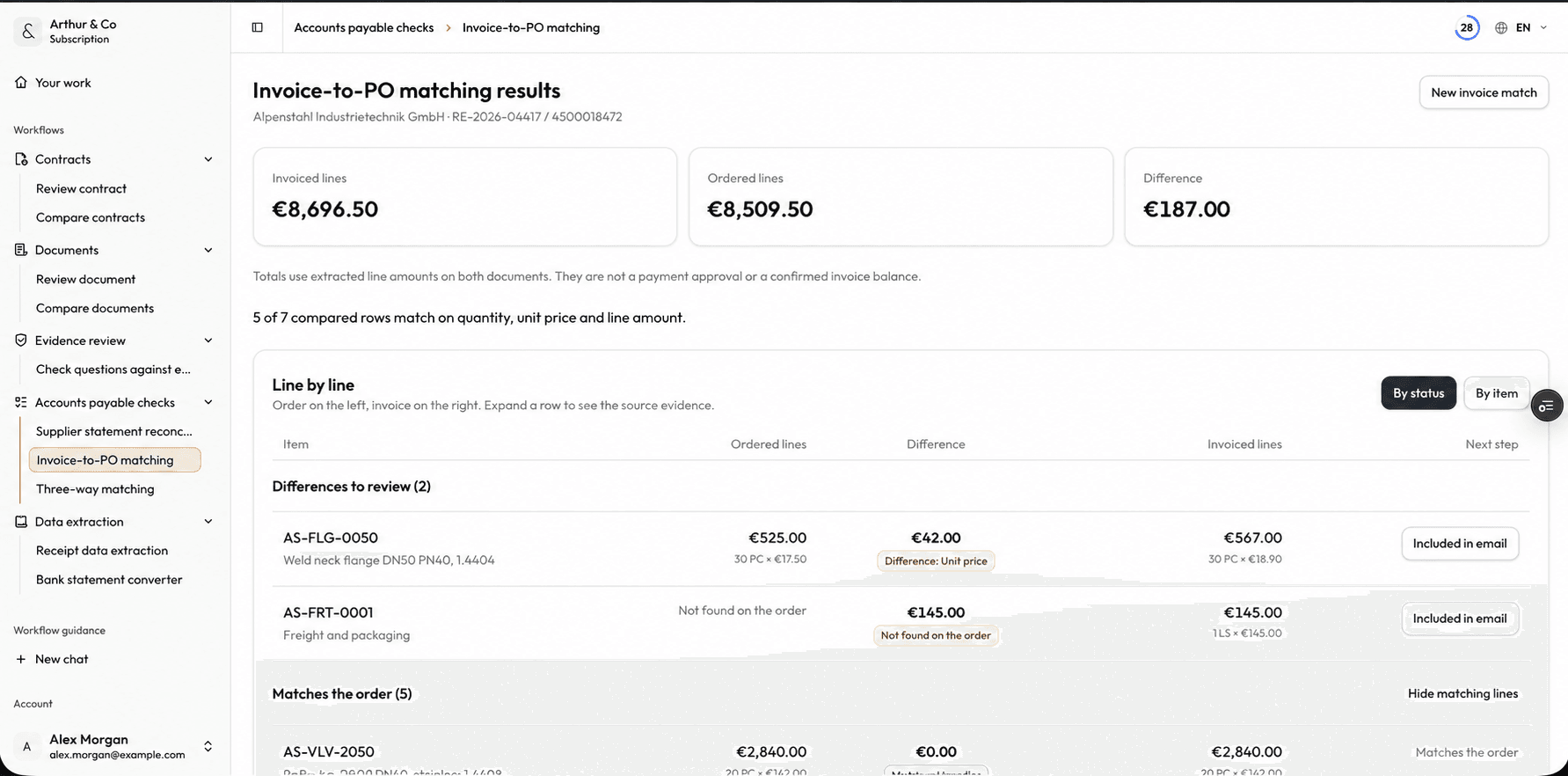
Compare ordered and invoiced lines to review price differences and extra charges. Dashboard shown in English.
Business impact
Put the discrepancies in front of the approver.
Compare the supplier invoice with its purchase order before approval and focus the review on values that do not agree.
01
Confirm what matches
See where supplier, quantity, price, tax, currency, and totals agree.
02
Surface discrepancies
Bring mismatched values forward before they become an approved payment.
03
Make approval easier
Decide whether to approve, correct, investigate, or return the invoice.
What you receive
A two-document match with the differences exposed.
The result keeps invoice and purchase-order values together so each discrepancy can be checked before approval.
Field matches
See which supplier, currency, tax, and total values agree.
Quantity differences
Find invoiced quantities that differ from the purchase order.
Price and tax differences
Surface unit-price, tax, and total discrepancies.
Approval exceptions
Leave with a focused list of points that need correction or explanation.
From documents to approval
Invoice and purchase order in. Exceptions out.
- 01
Add both documents
Upload the supplier invoice and the corresponding purchase order.
- 02
Review the match
Check supplier, quantity, price, tax, currency, and total values side by side.
- 03
Make the approval decision
Approve the match or send a specific discrepancy for correction or investigation.
For recurring invoice checks
Use the same pre-approval check on every invoice.
The paid workflow supports recurring invoice matching and keeps completed checks available inside one workspace.
- Keep completed matches available to reopen.
- Repeat the same structured check across supplier invoices.
- Review extracted values beside every discrepancy.
- Use invoice matching alongside the other active Arthur & Co workflows.
What it costs
One free run per verified email. No account or card required.
Platform costs €69 per month, or €55 per month billed yearly (€660 per year). All active workflows and 2 seats are included.
40 monthly credits cover 13 checks of up to 30 combined document pages each, using 39 credits. Longer checks use more credits.
See plans and usage limitsInvoice-to-PO matching questions.
Which files do I need?
Upload the supplier invoice and its corresponding purchase order. The workflow needs both documents to compare the values before approval.
Which values are compared?
The review checks supplier, quantity, unit price, tax, currency, and total values and surfaces discrepancies.
Does the workflow approve the invoice?
No. Arthur & Co prepares the match and discrepancy review. You decide whether to approve, correct, investigate, or return the invoice.
What does paid use add?
Start with one match free. Recurring use keeps completed checks available and includes invoice matching alongside every active workflow in Starter.
Related practical guides
Match your next invoice to its purchase order
Try the result with your own files before choosing a plan.
Match an invoice freeYou decide whether to change accounting records or approve a payment.