

Document review findings with source context
Review the available source references alongside the original document.
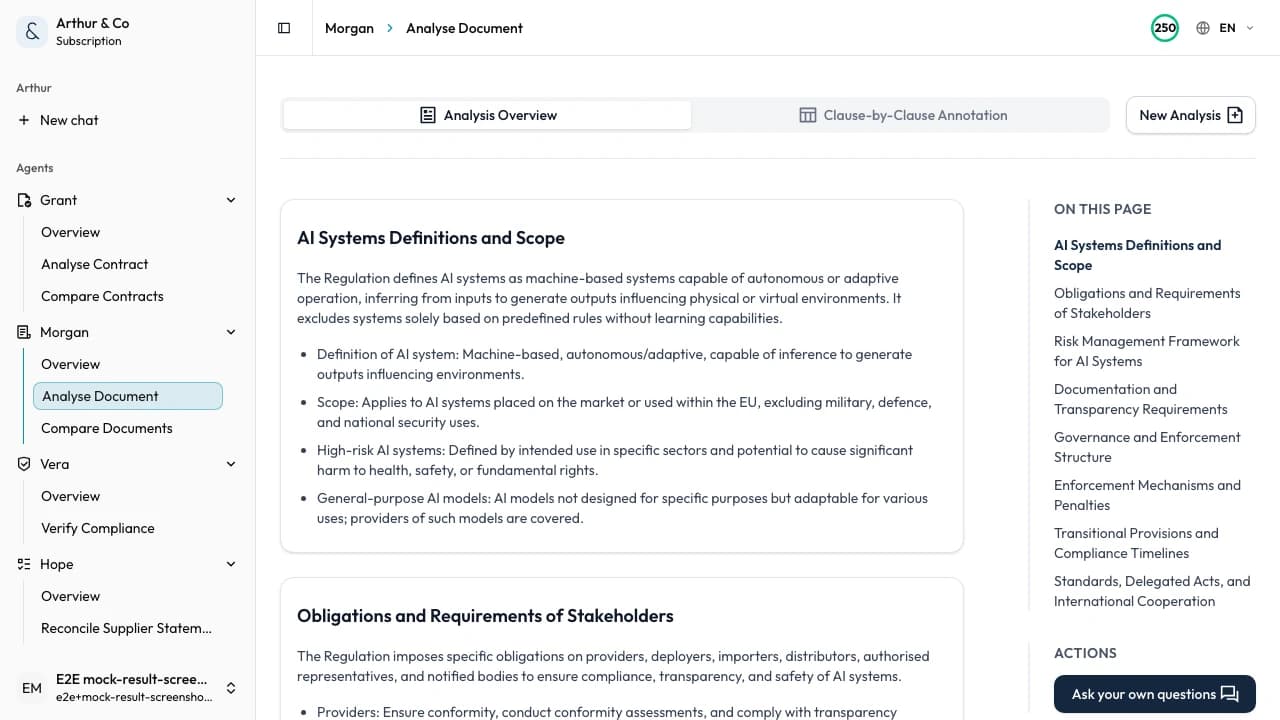
Example showing document findings, questions, and their source sections.
Business impact
Turn a long document into a usable next step.
A useful review should help you act on the document, not leave you with another summary to interpret.
01
Find the points that matter
Bring key facts, gaps, responsibilities, and unresolved questions to the surface.
02
Check the source
Keep each cited finding connected to the section that supports it.
03
Move the work forward
Decide what needs a response, correction, approval, or deeper investigation.
What you receive
A review you can use, not just read.
The result organises the document into findings and follow-up points that remain tied to the source.
Important findings
See the facts, commitments, and issues most relevant to the task.
Source sections
Open the passage behind a cited finding and check its context.
Gaps and ambiguities
Spot missing information or wording that needs clarification.
Follow-up questions
Leave with concrete questions for the author, owner, or reviewer.
From document to decision
One document in. A structured review out.
- 01
Add the document
Upload one PDF or Word policy, procedure, proposal, report, or other business document up to 30 MB and 600 pages.
- 02
Review the findings
Work through important points, gaps, and questions with source context where available.
- 03
Choose the next action
Decide what to approve, correct, clarify, investigate, or send for further review.
For recurring document work
Keep reviews available as the work continues.
The paid workflow supports teams that review business documents repeatedly and need a consistent record inside one workspace.
- Keep completed reviews available to reopen.
- Run the same structured review across new documents.
- Compare an original document with a revised version.
- Use document review alongside the other active Arthur & Co workflows.
What it costs.
Review one document free.
Document review and comparison cost €39 a month for one user.
The monthly plan covers 25 documents up to 20 pages. Larger documents use more of the plan allowance.
Need every active workflow? Platform costs €69 monthly, or €55 per month billed yearly, with 40 credits and 2 seats.
See full plans and usage limitsDocument review questions.
Which documents can I review?
Use the workflow for policies, procedures, proposals, reports, specifications, and other supported non-contract business documents supplied as PDF or Word files.
Can I verify the findings?
Yes. Cited findings link to the supporting section so you can inspect the wording and context before acting.
How is this different from contract review?
Document review is for supported non-contract business documents. Agreements that require contract-specific risk, protection, and negotiation analysis belong in Contract review.
What does the paid workflow add?
Start with one free review. Paid use keeps results available, supports repeated reviews and document comparison, and sits alongside the other active workflows.
Review the document in front of you.
Upload it and see the findings and questions that need your attention.
Review a document free