

See the expense fields behind one receipt
Merchant, tax and total come from the uploaded receipt. Review flags identify fields to check. Review, correct and download your free receipt result.
Receipt review
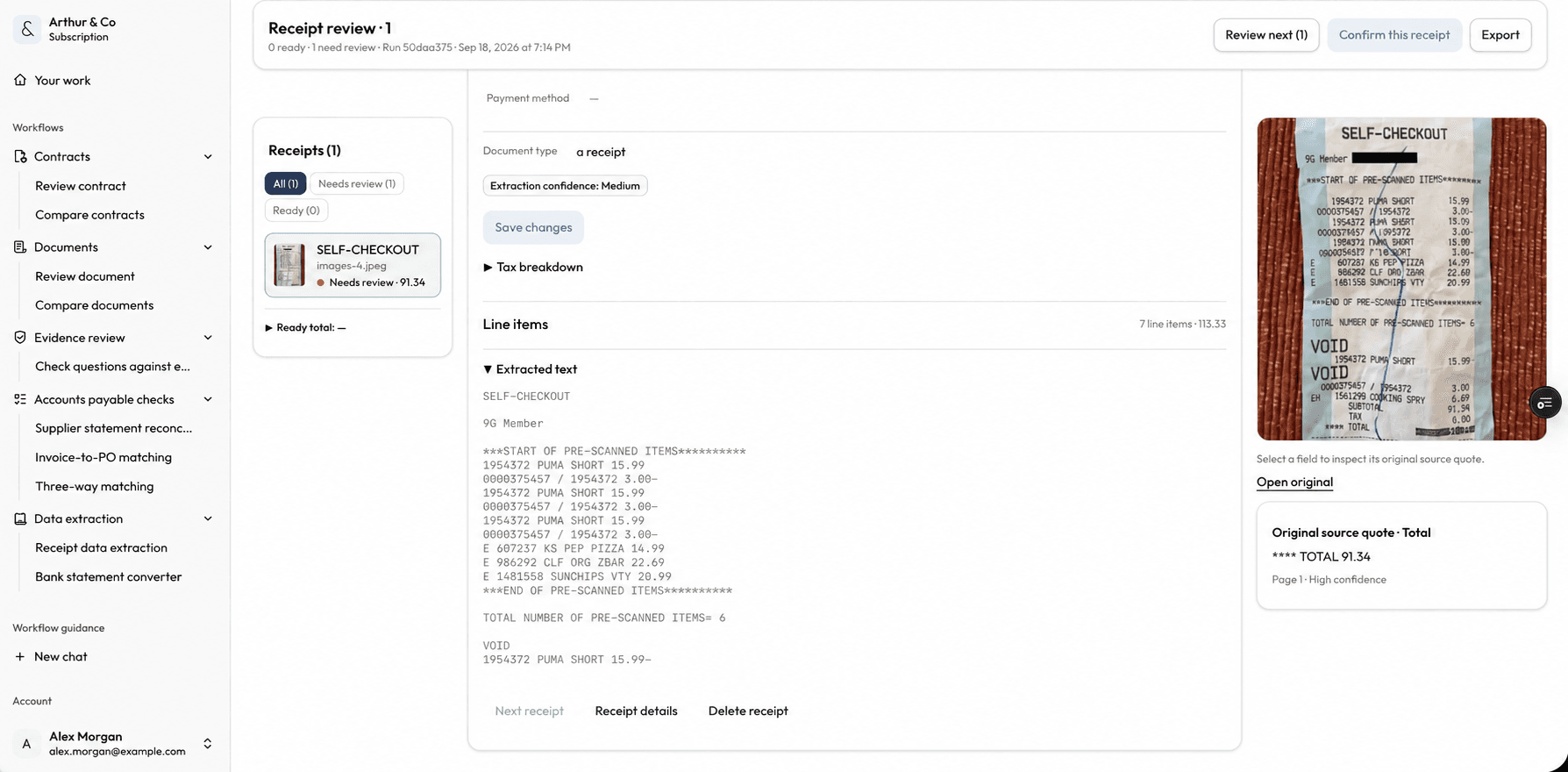
Review extracted receipt data alongside the original receipt and its source evidence. Dashboard shown in English.
Business impact
Turn receipt piles into reviewable expense data.
Extract the fields finance needs, surface uncertain values, and correct them before the data moves into a spreadsheet or accounting process.
01
Remove repetitive entry
Extract merchant, date, currency, tax, category, totals, and line items from receipt files.
02
Review uncertain fields
Bring low-confidence values forward so they can be checked against the receipt.
03
Export usable rows
Move corrected expense data into CSV or Excel for the next finance task.
What you receive
Structured expense rows with the receipt still in view.
The result keeps extracted fields and review flags together so corrections happen before export.
Core receipt fields
Merchant, date, currency, tax, category, and totals in consistent columns.
Line-item detail
Capture individual purchased items where the receipt provides them.
Low-confidence flags
See which extracted values deserve manual verification.
Export-ready data
Download corrected expense rows for spreadsheet or accounting work.
From receipt to expense row
Receipt in. Checked expense data out.
- 01
Add the receipt
Upload a receipt PDF or image. Start with one receipt free.
- 02
Review the extracted fields
Check merchant, date, tax, category, totals, line items, and any low-confidence values.
- 03
Correct and export
Fix values where needed and export the reviewed expense data.
For recurring expense processing
Use the same review before every export.
The paid workflow supports recurring receipt batches and keeps processed work available inside one workspace.
- Keep processed receipts available to revisit.
- Extract multiple receipt files through the same workflow.
- Review low-confidence fields before every export.
- Use receipt extraction alongside the other active Arthur & Co workflows.
What it costs
One free run per verified email. No account or card required.
Platform costs €69 per month, or €55 per month billed yearly (€660 per year). All active workflows and 2 seats are included.
Paid use accepts batches of up to 50 receipt files, up to 15 MB each, with editable rows and saved history.
See plans and usage limitsReceipt extraction questions.
Which receipt files can I upload?
Upload supported receipt PDFs or images. The workflow extracts fields from the receipt and keeps uncertain values visible for review.
Which fields are extracted?
The result can include merchant, date, currency, tax, category, totals, and line items where the receipt provides them.
Can I correct the result?
Yes. Review low-confidence fields against the receipt and correct extracted values before export.
What does paid use add?
Start with one receipt free. Paid use supports recurring processing, keeps prior work available, and includes extraction alongside every active workflow in Starter.
Related practical guides
Extract the expense data from your next receipt
Try the result with your own files before choosing a plan.
Extract one receipt freeYou decide whether to correct or reimburse an expense; extraction does not post it to your accounts.