

Questions and evidence review: answers and sources
Each draft answer includes its source and shows whether the evidence covers it fully, partly, or not at all.
Evidence review results
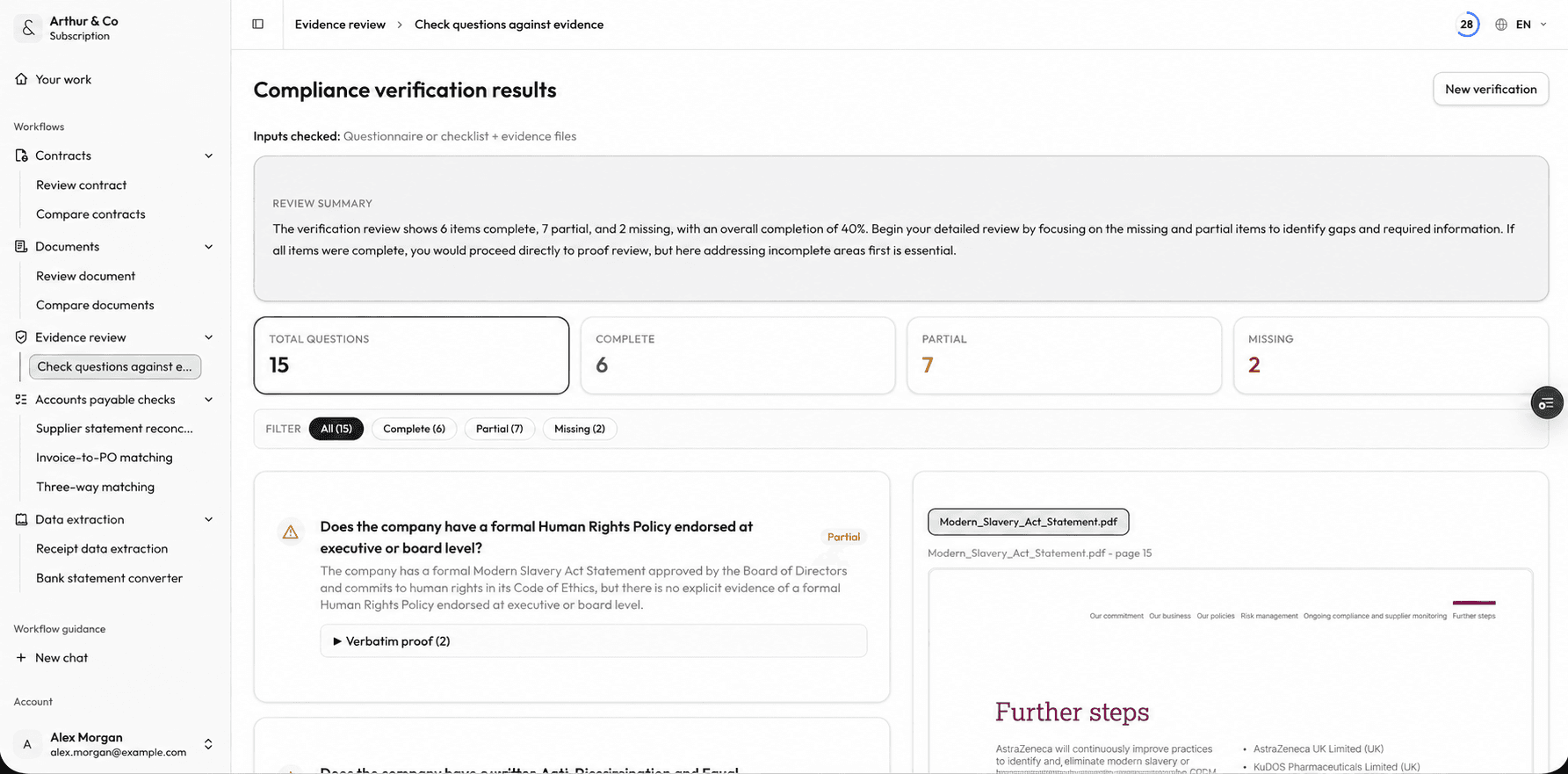
Review each answer and its coverage status alongside the supporting document. Dashboard shown in English.
Business impact
Answer from evidence, not memory.
A questionnaire moves faster when each draft answer comes with its source and every evidence gap remains visible.
01
Draft from the files you have
Use policies, reports, and supporting documents to prepare answers grounded in available evidence.
02
See what the evidence covers
Distinguish fully supported, partly supported, and unanswered questions before submission.
03
Close the right gaps
Focus follow-up work on missing evidence instead of rereading every file.
What you receive
A questionnaire review with the evidence attached.
The result keeps answers, sources, and gaps together so the person responsible can verify and complete the response.
Draft answers
Start from a proposed answer grounded in the uploaded evidence.
Source references
See which file and passage support each answer.
Coverage status
Know whether the evidence covers a question fully, partly, or not at all.
Missing-evidence list
Leave with a focused list of documents or facts still needed.
From questions to reviewed answers
Questions and files in. Cited answers and gaps out.
- 01
Add questions and evidence
Enter questions or upload a questionnaire, then add the PDF or Word files that may contain the answers.
- 02
Review every answer
Check the draft, source passage, and coverage status for each question.
- 03
Correct or complete
Edit the answer, find missing evidence, and decide what is ready to submit.
For recurring evidence requests
Keep answers and sources available for the next request.
The paid workflow supports teams that answer questionnaires repeatedly and need a traceable review record in one workspace.
- Keep completed evidence reviews available to reopen.
- Run new questionnaires through the same structured workflow.
- Reuse the wider evidence set across recurring requests.
- Use evidence review alongside the other active Arthur & Co workflows.
What it costs.
Check one set of questions free.
Evidence review costs €39 a month for one user.
The monthly plan covers 25 evidence reviews up to 20 pages. Larger reviews use more of the plan allowance.
Need every active workflow? Platform costs €69 monthly, or €55 per month billed yearly, with 40 credits and 2 seats.
See full plans and usage limitsQuestions and evidence review FAQs.
What can I use as evidence?
Upload supported PDF or Word policies, reports, procedures, and other files that may answer the questionnaire. Each file can be up to 30 MB and 600 pages.
How are unsupported questions handled?
The result marks whether a question is fully supported, partly supported, or not supported and keeps missing evidence visible for follow-up.
Can I submit the draft answers directly?
Review them first. Arthur & Co drafts answers and shows the supporting evidence; you remain responsible for corrections and submission.
What does paid use add?
Start with one evidence check free. Paid use keeps reviews available, supports recurring questionnaires, and provides access alongside the other active workflows.
Choose a free tool for your documents
Related practical guides
Check your questions against the evidence.
Upload the questions and supporting files, then review every answer and gap.
Check questions against evidenceArthur & Co drafts answers and shows the supporting evidence. You review and submit them.