

See the change. Check both clauses behind it.
Move between the ranked comparison and the wording in both contracts. Each cited change stays close to the evidence you need to verify it.
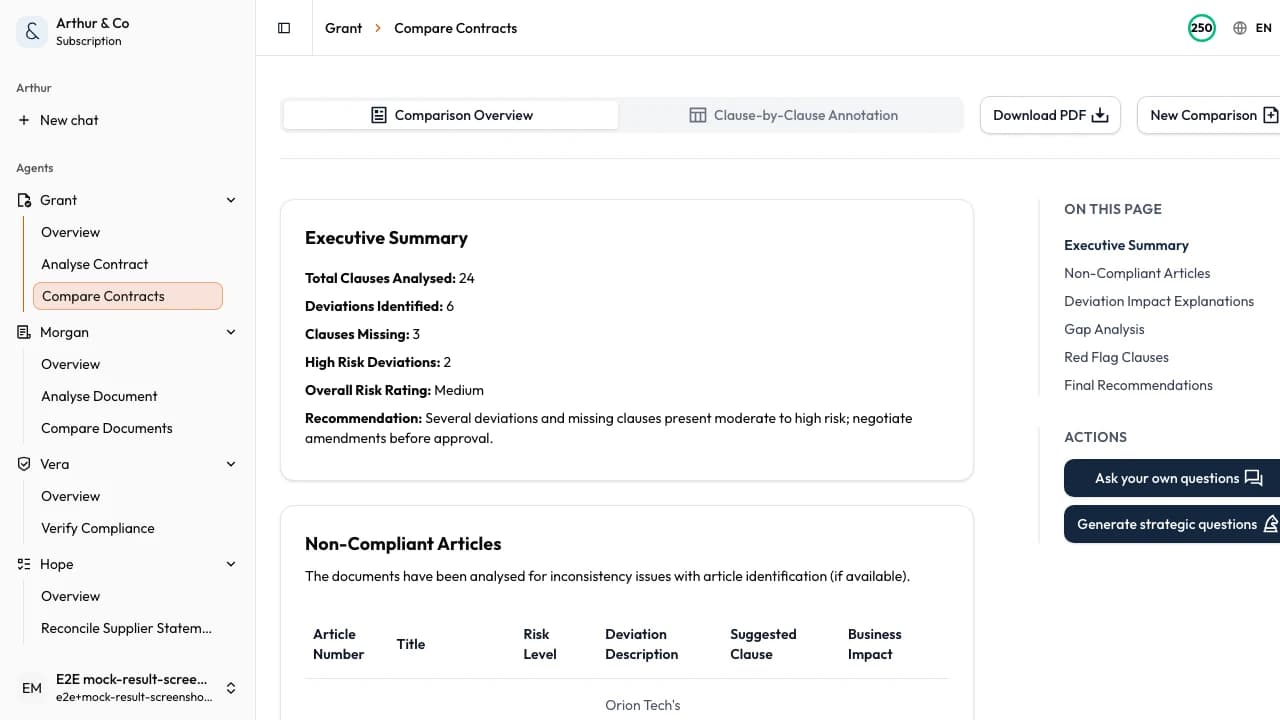
Example showing an important change and its wording in both contracts.
Business impact
Find the changes that alter the deal.
A useful comparison does more than highlight edited words. It shows which changes affect risk, responsibility, and the decision in front of you.
01
Focus on material changes
Separate risk-relevant changes from formatting and routine drafting noise.
02
Understand the effect
See why a changed clause matters before you accept a revised position.
03
Prepare the response
Take specific changes into approval, negotiation, or qualified legal review.
What you receive
A comparison built around the decision.
The result connects each important change to both versions, so the next conversation starts with evidence rather than another read-through.
Ranked changes
See the revisions most likely to affect the agreement first.
Plain-language impact
Understand how the new wording may change obligations, protections, or exposure.
Both source clauses
Check the previous and revised wording together without hunting through two files.
Questions to resolve
Turn each material change into a point for approval, negotiation, or further review.
From versions to decision
Two contracts in. The important changes out.
- 01
Add both contracts
Upload the baseline and revised contract as PDF or Word files, up to 30 MB and 600 pages each.
- 02
Review the changes
Work through ranked differences and check each one against the wording in both versions.
- 03
Decide what moves
Choose what to accept, negotiate, approve, or escalate before the new version is signed.
For recurring contract work
Keep every revision connected to its review.
The paid workflow is for renewals, redlines, and repeated comparisons that need to remain available in one workspace.
- Keep completed comparisons available to reopen.
- Compare new drafts and renewals through the same structured workflow.
- Move from comparison into a full single-contract review when needed.
- Use contract workflows alongside the other active Arthur & Co workflows.
What it costs.
Comparison is available with a paid plan.
Contract review and comparison cost €39 a month for one user.
The monthly plan covers eight comparisons up to 30 combined pages. Larger comparisons use more of the plan allowance.
Need every active workflow? Platform costs €69 monthly, or €55 per month billed yearly, with 40 credits and 2 seats.
See full plans and usage limitsContract comparison questions.
What should I upload?
Upload the baseline contract and the revised draft or renewal as PDF or Word files. Clearly assigning the old and new versions helps keep the comparison direction unambiguous.
Does it only show word-level edits?
No. The comparison is organised around material changes and their effect, with the relevant wording from both contracts available for verification.
Is a free contract comparison available?
Not yet. Contract comparison is available through the paid Contract workflows plan. You can still review one individual contract free.
Does this replace legal advice?
No. Arthur & Co structures the changes and links them to both contracts. You remain responsible for approval, negotiation, signing, and deciding when qualified legal advice is needed.
Compare the contracts in front of you.
See which changes affect risk, responsibility, and the decision before the revised contract moves forward.
See pricingArthur & Co compares both contracts and links each change to the wording. You choose when legal advice is needed.