

Document comparison with both versions in view
See important additions, removals, and changed responsibilities with the relevant wording from both versions.
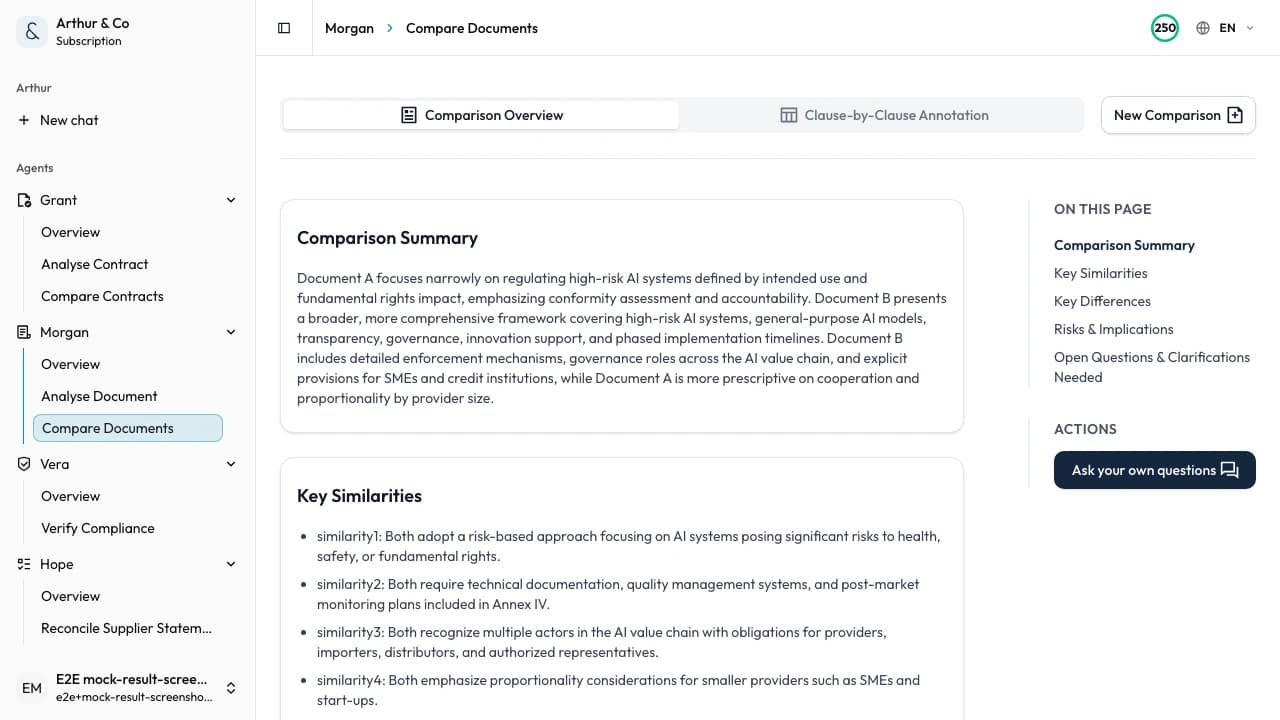
Example showing an important change and its wording in both documents.
Business impact
See which changes affect the work.
A useful comparison separates meaningful operational changes from routine edits and formatting noise.
01
Find material changes
Surface additions, removals, and changed responsibilities that may alter the work.
02
Understand the consequence
See what a revision changes in practice before the new version is approved.
03
Assign the next action
Turn each important difference into a point to accept, clarify, correct, or escalate.
What you receive
A comparison organised around what changed.
The result connects material differences to both source documents so the revised version is easier to assess.
Important additions
See new content that changes scope, requirements, or responsibilities.
Material removals
Find wording or obligations that disappeared from the revised version.
Changed responsibilities
Identify where ownership, timing, or expected action has moved.
Both source passages
Check each cited change against the wording in the old and new documents.
From versions to decision
Two documents in. The changes that matter out.
- 01
Add both versions
Upload the original and revised non-contract documents as PDF or Word files, up to 30 MB and 600 pages each.
- 02
Review the differences
Work through important additions, removals, and changed responsibilities with both source passages.
- 03
Decide what follows
Choose what to accept, clarify, correct, approve, or investigate before the new version is used.
For recurring document work
Keep every version connected to its comparison.
The paid workflow supports policies, procedures, proposals, and reports that change repeatedly and need a consistent review record.
- Keep completed comparisons available to reopen.
- Compare new revisions through the same structured workflow.
- Move from comparison into a full single-document review when needed.
- Use document workflows alongside the other active Arthur & Co workflows.
What it costs.
Comparison is available with a paid plan.
Document review and comparison cost €39 a month for one user.
The monthly plan covers eight comparisons up to 30 combined pages. Larger comparisons use more of the plan allowance.
Need every active workflow? Platform costs €69 monthly, or €55 per month billed yearly, with 40 credits and 2 seats.
See full plans and usage limitsDocument comparison questions.
Which documents can I compare?
Use the workflow for two versions of a supported non-contract policy, procedure, proposal, report, specification, or other business document in PDF or Word format.
Does it only show text edits?
No. The result organises additions, removals, and changed responsibilities by their relevance to the work, with source wording from both versions.
Is a free document comparison available?
Not yet. Document comparison is available through the paid Document workflows plan. You can still review one individual business document free.
Should I use this for contracts?
No. Use Contract comparison when the documents are agreements and the decision depends on contract-specific risk, protections, or negotiation positions.
Compare the documents in front of you.
See which additions, removals, and changed responsibilities need action before the revised document is used.
See pricing