Home
Company logo

Morgan workflow

Compare two documents

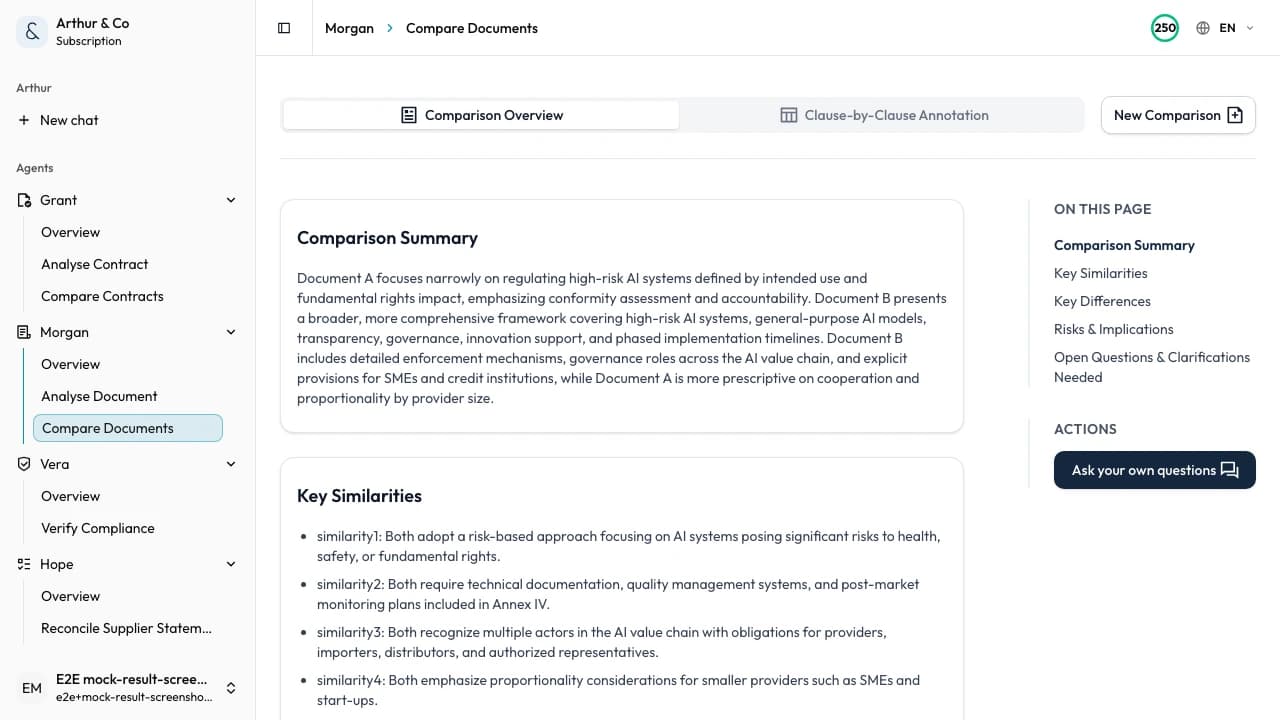
Upload two document versions and see every difference — what changed, what's missing, and what matters most.

Manual side-by-side comparison takes 2-4 hours and still misses changes buried on page 38. Morgan compares two document versions in 60-90 seconds — highlighting content changes, structural differences, and key term variations, all prioritized by importance. Upload policies, SOPs, pricing sheets, specs, proposals, regulations, or any business document.

Quick stats

Review time reduction

Up to 80%

Comparison time

60-90 seconds

Time saved monthly

15-25 hours

Demo

See Morgan compare two documents in under 90 seconds

Upload two versions of any document. Morgan highlights what was added, removed, or modified — with every change prioritized by importance.

Strengths

  • Side-by-side comparison with differences highlighted
  • Priority flagging (critical, moderate, minor)
  • Key term variation tracking (pricing, dates, names, obligations)
  • Missing element detection between documents

What can it do?

Content change detection

Identifies text that was added, removed, or modified between the two documents — every change is flagged and categorized.

Structural difference analysis

Detects sections reordered, content moved, and structural changes that a simple text diff would miss.

Key term variation tracking

Spots changes in pricing, dates, names, and obligations between two document versions.

Missing element detection

Flags content present in one document but absent in the other — sections, definitions, or key terms.

Semantic understanding

Recognizes when different wording carries the same meaning, reducing false positives in your review.

Priority flagging

Categorizes every difference as critical, moderate, or minor so you focus on what matters most.

Workflow

  1. 1Upload the original document (PDF or DOCX)
  2. 2Upload the updated or alternative version
  3. 3Morgan compares both documents and categorizes all differences in 60-90 seconds
  4. 4Review the comparison, priority-flagged differences, and plain English summary
  5. 5Download the report or share findings with your team

Inputs

  • Policies and procedures (handbooks, compliance policies, SOPs)
  • Regulations and guidance updates
  • Proposals and pricing sheets
  • Technical specs and requirements documents
  • Financial documents (reports, projections, statements)
  • Employee handbooks and training manuals

Outputs

  • Side-by-side comparison with highlighted differences
  • Plain English change summary with priority flags
  • Section-by-section breakdown of changes
  • Key term variation report
  • Downloadable report (PDF or Word)

Use cases

  • Policy comparison — spot changes between two policy versions, from HR handbooks to compliance procedures
  • SOP comparison — compare two versions of a standard operating procedure and flag process changes
  • Regulation comparison — review a regulatory update against the previous version to stay ahead of compliance
  • Proposal comparison — compare two vendor proposals or RFP responses side by side
  • Pricing sheet comparison — detect pricing changes and hidden cost adjustments between two supplier quotes
  • Technical spec comparison — identify requirement changes and engineering updates between spec revisions
  • Handbook comparison — compare employee handbook versions to see what changed before rollout

Case study

Meridian Ops caught a buried pricing change on page 38

We used to spend 3 hours reviewing each document pair. Morgan flagged the critical changes in 90 seconds — including one we would have missed.

Review time cut from 3 hours to 20 minutes per comparison. 15 hours saved per month across the team.

FAQ

What types of documents can Morgan compare?

Any document type: policies, SOPs, regulations, proposals, pricing sheets, technical specs, financial reports, handbooks, and more. Upload two PDFs or DOCX files and get results in 60-90 seconds.

How is Morgan different from Word's Compare Documents feature?

Word Compare only works with .docx files and produces overwhelming tracked changes. Morgan also handles PDFs, prioritizes changes by importance, and gives you a plain English summary — not a sea of red markup.

What's the difference between Morgan and Grant?

Grant is specialized for contracts — it provides legal risk assessment, clause-by-clause annotations, gap analysis, and negotiation prep. Morgan handles any document type: policies, specs, proposals, regulations, and more. Use Grant for contracts, Morgan for everything else.

What file formats does Morgan accept?

Morgan accepts PDF and DOCX files. You can mix formats — for example, a PDF original and a DOCX revision.

How long does a comparison take?

Most comparisons complete in 60-90 seconds. Upload takes about 10 seconds, then Morgan analyses both documents while you wait.

Does Morgan work in languages other than English?

Yes. Morgan supports 20+ languages for document comparison, making it suitable for teams working with multilingual documents.

What happens when Morgan finds critical differences?

Critical changes are flagged at the top of the report with clear explanations. You see exactly what changed, where, and why it matters — so you can act on the most important items first.

Is my document data secure?

Your documents are processed securely and are not used to train AI models. Always review critical findings manually before acting on results.

Pronto para analisar o seu próximo documento?

Upload your first document pair and get a full comparison in 60-90 seconds — no credit card required.

Morgan identifies differences between documents but does not guarantee 100% accuracy. Semantic matching is AI-assisted; verify equivalent terms in context. Always review critical changes manually.