Evidence review assistant
Run by Vera
Upload your questions and evidence. Vera shows what's answered, what's missing, and what still needs a human look.
Stop checking documents one by one. Vera compares your questions with the supporting files, shows which answers are covered, and flags anything missing before approval.
Workflows
Generic AI can describe the task. Arthur & Co runs the configured workflow and returns a structured output your team can use.
Vera
Review questions with evidence
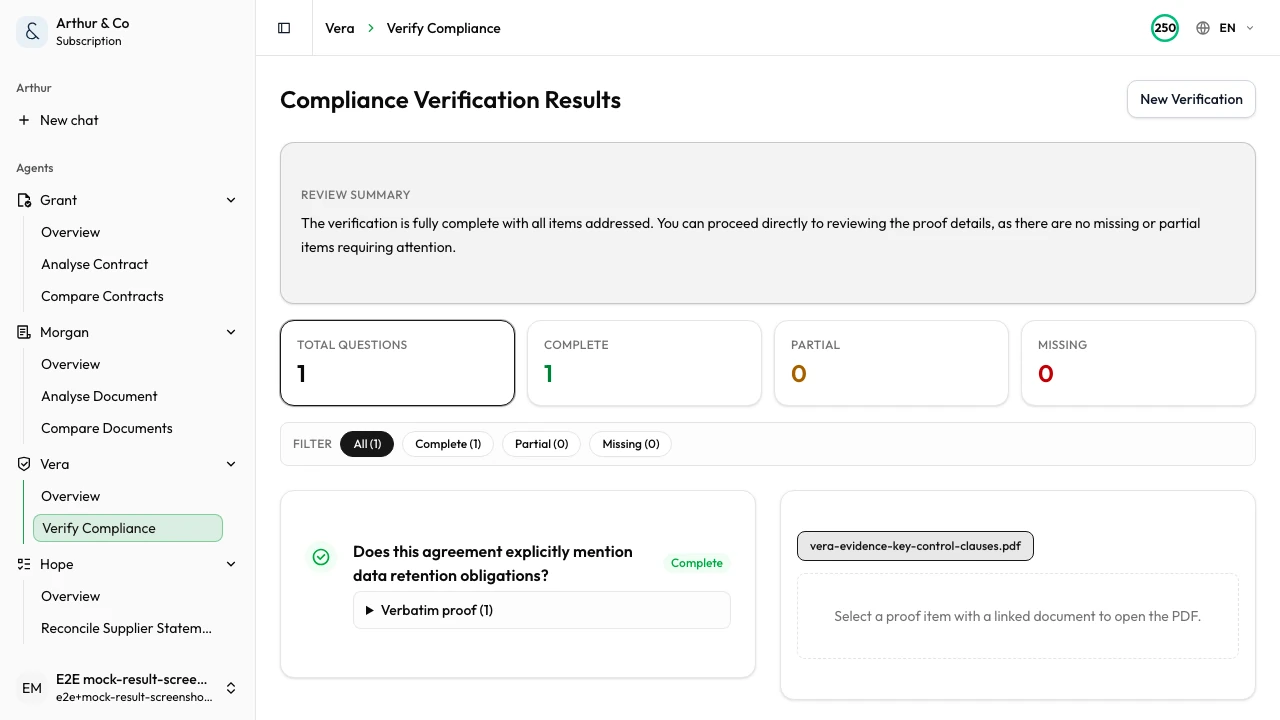
Upload your questions and supporting files. Vera checks each item and shows what is answered, partial, or missing.
Review time
Under 5 minutes
Review focus
Questions first
Output
Answered / partial / missing
Demo
See every requirement checked against your evidence
Upload your checklist and supporting documents. Vera checks each item, marks what is covered, partial, or missing, and hands you a structured gap list for follow-up.
Strengths
- See what is answered
- Spot missing proof fast
- Clear status for every item
- Easy to review before approval
What can it do?
Questions and evidence matching
Vera compares each question against the supporting files and shows what is covered.
Missing answer detection
Missing files, missing answers, and incomplete evidence are easy to spot before you move forward.
Security questionnaire support
Upload a buyer's security questionnaire with your SOC 2, policies, DPA, subprocessors list, and prior answers. Vera prepares evidence-backed answers and marks what still needs review.
Status per item
Each question can be marked as answered, partial, or missing so the review stays structured.
Local version comparison
When a checklist has local versions or add-ons, Vera can surface the differences without manual cross-checking.
Simple review summary
The workflow can produce a concise summary of what is covered, what is missing, and what needs follow-up.
Large file review
Large evidence packs stay organized so reviewers do not have to search across files to confirm coverage.
Workflow
- 1Upload the questions and the supporting files
- 2Vera checks each item against the documents
- 3Review the answered, partial, and missing items
- 4Export the summary for the next step
Inputs
- Question list or checklist
- Supporting evidence files
- Optional local versions or add-ons
- Optional review notes
Outputs
- Coverage summary
- Missing item list
- Answered / partial / missing status
- Review notes
Use cases
- Supplier approval - Check whether the submission answers the required questions.
- Security questionnaires - Fill buyer security questions with source-backed answers before sales sends them back.
- Policy review - Check evidence against a policy or control set before escalation.
- Audit prep - Turn a messy evidence bundle into a structured gap list.
FAQ
Ready to review your next question set?
Upload your questions and supporting files. Get a clear review in minutes.
Vera helps review evidence against questions and does not guarantee 100% accuracy. Always review flagged gaps before relying on the result. Vera does not replace qualified legal, regulatory, or compliance advice.